Posts

Hatsune Miku V6 English Phoneme Guide

   BEFORE YOU START Hatsune Miku V6 is not intended to be realistic, automatically perfect out of the box, or anything akin to modern AI Vocalsynth engines. This is why they didn't put AI in her Voicebank name. However, her ease of use, tuneability and potential for expression is MUCH higher than any of her previous NT or VOCALOID Voicebanks. In this guide I'll be showing you how to make the most of her English Cross-Lingual capabilities specifically.  VOWEL CONVERSION Hatsune Miku is voiced by Saki Fujita, who is NOT a native English speaker. This voicebank relies heavily on VOCALOID6's AI converting her Japanese phonetics into English, even with the supplemental (speculative) Miku V4 English data added in there she still has a certain amount of trouble producing fluent English sounds. This also is not intended to be a "fix" or an "improvement" as keeping her Japanese accent fully intact is an equally appealing process that already sounds pretty good in...

How to make Hatsune Miku NT1.0 sing in somewhat fluent english

Image
 BEFORE YOU START This guide will only teach you how to correct pronunciation, there aren't really any concrete rules on pitch or whatever else tuning you'll be using this for. Hatsune Miku NT is a Japanese voice library that doesn't have any English capabilities whatsoever and this is a pretty involved process since you'll have to fully tune your main vocals in two separate engines, but I think the end result is definitely worth it. If you're down with all that, let's get started.

Step-by-step process of how I use Hatsune Miku NT

Image
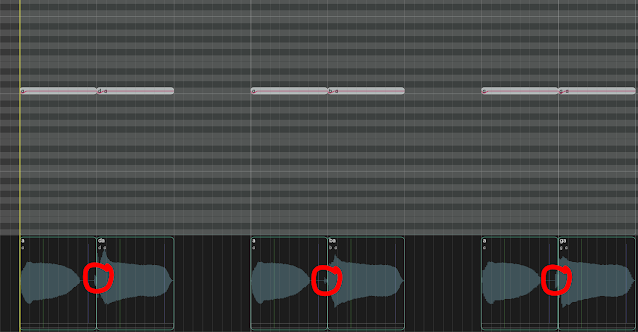
 STEP 1. TUNE EVERYTHING This section is going to be unnecessarily detailed and probably slightly intimidating but bear with me. Piapro Studio NT has certain quirks and oddities that I make sure to iron out before I do anything else, so below I'll provide a list of pronunciation tips to make Hatsune Miku NT sound slightly less stilted, of course these aren't the end all be all of natural pronunciation and I am also NOT a native 日本語 speaker, but I hope these help regardless. CONSONANTS SUCH AS D, B AND G By default, Piapro Studio NT will try to space every consonant out to be relatively the same length, this can lead to some issues with sounds being awkwardly drawn out or the attack sounding odd.  For example: The consonants at the start of these notes are going to be unnecessarily loud and unnatural sounding, D and B specifically don't usually have a visible "pop" at the start of the waveform.  In order to fix this, we'll have to do the following: For "d...

How to make realistic end breaths with VOCALOID

 For this specific technique you'll need a VOCALOID with breath .WAVs included in their files, but you could probably get away with using a different VOCALOID's breath sounds if they don't have their own. This should really work for any song you try it on as long as you don't over-use it, the only thing you'll need is a VOCALOID render. Let's take this simple "a" note. Render it out and put it in an audio editing software of your choice (even a DAW will probably do, anything that can cut and paste audio works) I'll be using RX9 Audio Editor. Now open up one of Miku's breath .WAV files as well. Select the second half of the breath sample. and copy it with CTRL + C (or just right click > copy) Now just take the part you copied, and replace the end of the "a" we exported! If it doesn't sound right, or if the breath is too high sounding, just pitch the breath up/down or use a different sample entirely. This doesn't work in eve...